본문 바로가기

scss min option

이온디 2020.03.03 13:56 조회 930 댓글 1
목록 글쓰기

https://www.devinuk.com/en/how-to-set-up-node-js-scss-watcher-in-phpstorm-node-sass/
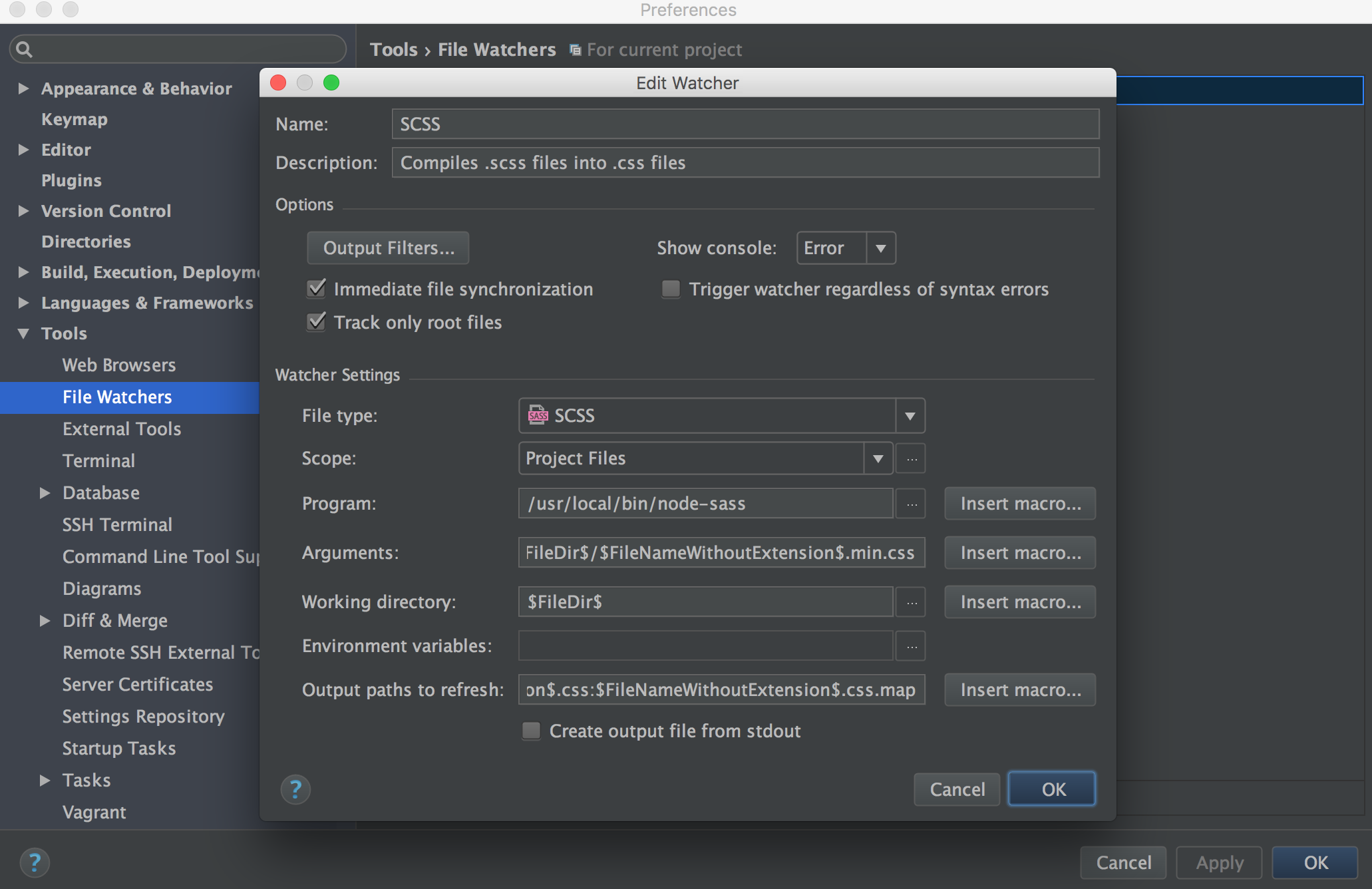
https://www.devinuk.com/en/how-to-set-up-node-js-scss-watcher-in-phpstorm-node-sass/" style="height: 255px;">https://www.devinuk.com/en/how-to-set-up-node-js-scss-watcher-in-phpstorm-node-sass/

PhpStorm scss file watcher

If you’re running unix based system like ubuntu or mac, first install globally

npm install node-sass -g

With this command you’ll get full path of node-sass package

which node-sass

which you need to put into Program field, usually it will be:

/usr/local/bin/node-sass

In Arguments if you just want to transpile, simple put:

$FileName$ --output-style compressed $FileDir$/$FileNameWithoutExtension$.css

If you want to transpile and compress, also using min postfix in file name, try this:
$FileName$ --output-style compressed $FileDir$/$FileNameWithoutExtension$.min.css

For generating map file use --source-map true
$FileName$ --source-map true --output-style compressed $FileDir$/$FileNameWithoutExtension$.min.css

For more options please check this https://github.com/sass/node-sass#command-line-interface

Leave the rest of the settings as they are.

Now once you save any .scss file, it should be automatically transpile into the same folder.


https://stackoverflow.com/questions/40579330/minify-css-with-node-sass

https://stackoverflow.com/questions/40579330/minify-css-with-node-sass" style="height: 251px;">https://stackoverflow.com/questions/40579330/minify-css-with-node-sass

https://turfrain.tistory.com/entry/Grunt-설치기본세팅

https://turfrain.tistory.com/entry/Grunt-설치기본세팅">https://turfrain.tistory.com/entry/Grunt-설치기본세팅

https://m.blog.naver.com/PostView.nhn?blogId=psj9102&logNo=221172192880&proxyReferer=https%3A%2F%2Fwww.google.com%2F

https://m.blog.naver.com/PostView.nhn?blogId=psj9102&logNo=221172192880&proxyReferer=https%3A%2F%2Fwww.google.com%2F" style="height: 451px;">https://m.blog.naver.com/PostView.nhn?blogId=psj9102&logNo=221172192880&proxyReferer=https%3A%2F%2Fwww.google.com%2F

https://github.com/sass/node-sass/blob/master/bin/node-sass

https://github.com/sass/node-sass/blob/master/bin/node-sass" style="height: 170px;">https://github.com/sass/node-sass/blob/master/bin/node-sass


댓글 1

이온디 2026.01.05 06:29
⏺ Dart Sass 버전이 더 최신이라 --source-map도 플래그가 아닌 것 같습니다. 버전을 확인해보겠습니다: ⏺ Bash(/usr/local/bin/sass --version 2>&1) ⎿ Ruby Sass 3.7.4 ⏺ Ruby Sass 3.7.4입니다. Ruby Sass는 더 이상 지원되지 않으며, 옵션 문법이 다릅니다. Ruby Sass 올바른 문법 $FileName$ $FileNameWithoutExtension$.min.css --style compressed --sourcemap=auto 또는 소스맵 없이: $FileName$ $FileNameWithoutExtension$.min.css --style compressed 권장: Dart Sass로 업그레이드 Ruby Sass는 2019년에 지원 종료되었습니다. Dart Sass로 업그레이드하세요: brew install sass/sass/sass 설치 후 경로 확인: which sass # /opt/homebrew/bin/sass (Apple Silicon) 또는 /usr/local/bin/sass (Intel) Dart Sass 설치 후 File Watcher Arguments: $FileName$:$FileNameWithoutExtension$.min.css --style=compressed --source-map > $FileName$ $FileNameWithoutExtension$.min.css --style compressed --sourcemap=auto 이걸로 하니깐 됐음

댓글을 작성하려면 로그인이 필요합니다.